
From Podcast to Publishable Shorts
How to Make Multiple Clips from One Podcast Episode
Make distinct clips from one podcast, reuse schemes without losing context, and prepare saved video clips for a professional editor.
You want several posts from one podcast episode, but the shortlist keeps circling the same point. One version is shorter, another has a sharper title, and a third begins two sentences earlier. To repurpose a podcast into multiple useful clips, start with different questions the episode answers. This guide shows how to turn ClipPrism’s suggestions into a set of distinct post ideas.
Build a set around different viewer questions. Give every clip a clear takeaway and a passage that supports it. Use alternate cuts to choose the best version of an idea before counting it as another post.
Our interview example produced six automatic candidates, followed by three topic-search candidates. We used that pool to identify three possible angles and decide which overlapping versions to keep.
1. Turn the episode into a map of viewer needs
For an interview creator or a small production team, the constraint is often review time. A list of timestamps still leaves someone to decide what each post offers. Start by writing the questions the recording actually answers.
For The Build Log conversation with Colin Sidoti, the suggested clips cover a long startup ramp-up, the founder’s view of an IPO, and criteria for customer feature requests. These share a speaker and an episode, but they can serve different viewer needs: encouragement, perspective on success, and a practical product decision.
Do not force every episode into a fixed quota. Some recordings contain one strong standalone answer and several incomplete references. A smaller set with different purposes is more useful than a larger set whose titles promise differences the footage never delivers.
2. Give three possible posts three different jobs
These three candidates offer different starting points for a post. Use the timestamps to find each passage, then check the surrounding question and answer before choosing its boundaries.
| Candidate and source time | Viewer question | Editorial job and next check |
|---|---|---|
| Clip 3: long ramp-up 02:07–02:30 | How do you keep going when building takes longer than expected? | A reflective post about uncertainty and encouragement. Check the ending: the analysis flags a move into a new topic. |
| Clip 1: IPO and continued ownership 04:16–04:28 | What does success look like if the founder wants to keep running the company? | A perspective post. Review the preceding question so “having fun” has a subject and does not become a universal claim about IPOs. |
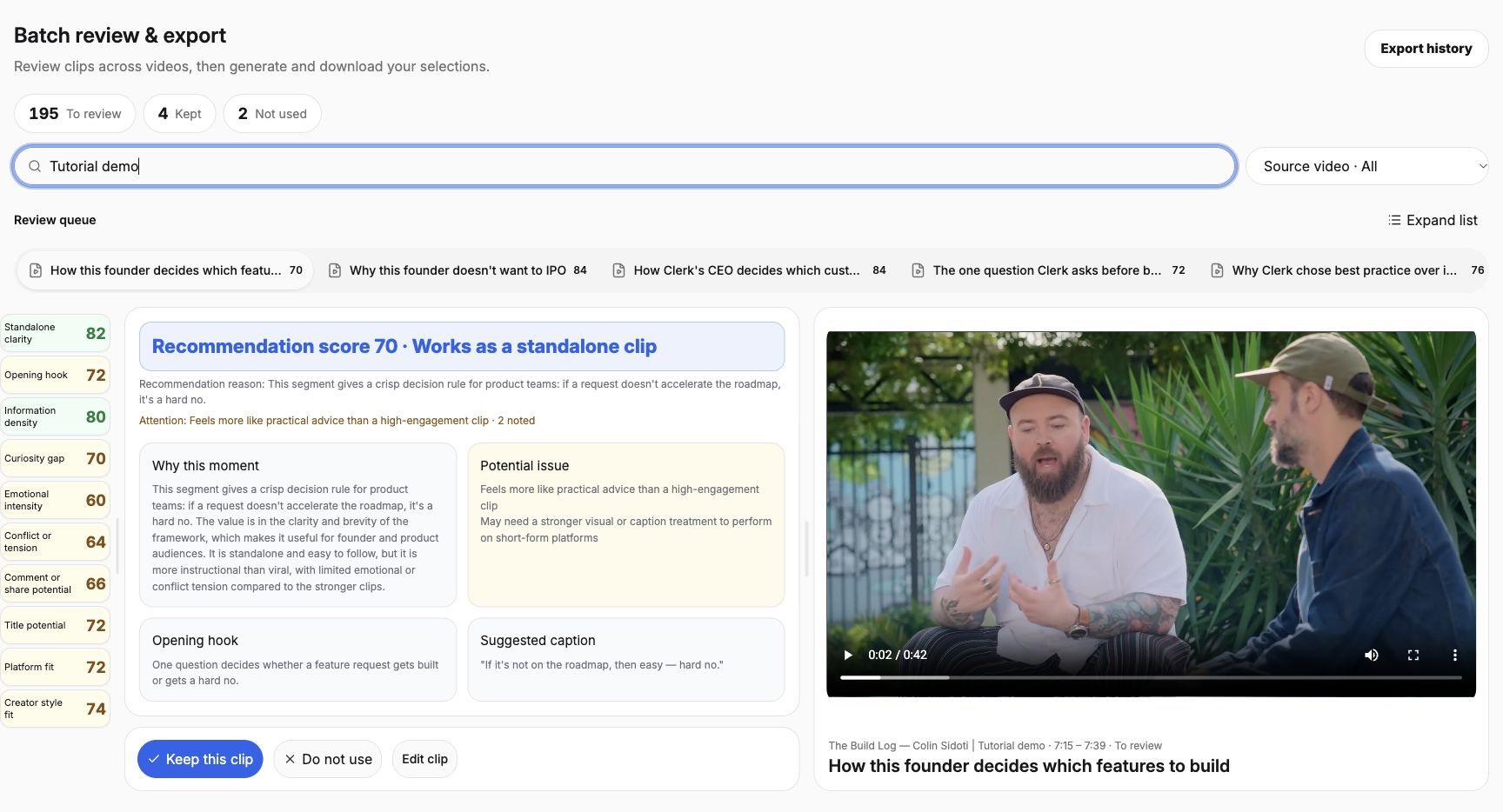
| Clip 6: roadmap criterion 07:28–07:40 candidate; revised start 07:15.1 | Which feature requests fit the direction of the product? | A practical decision example. Use the reviewed question-and-answer version and label it as one criterion. |
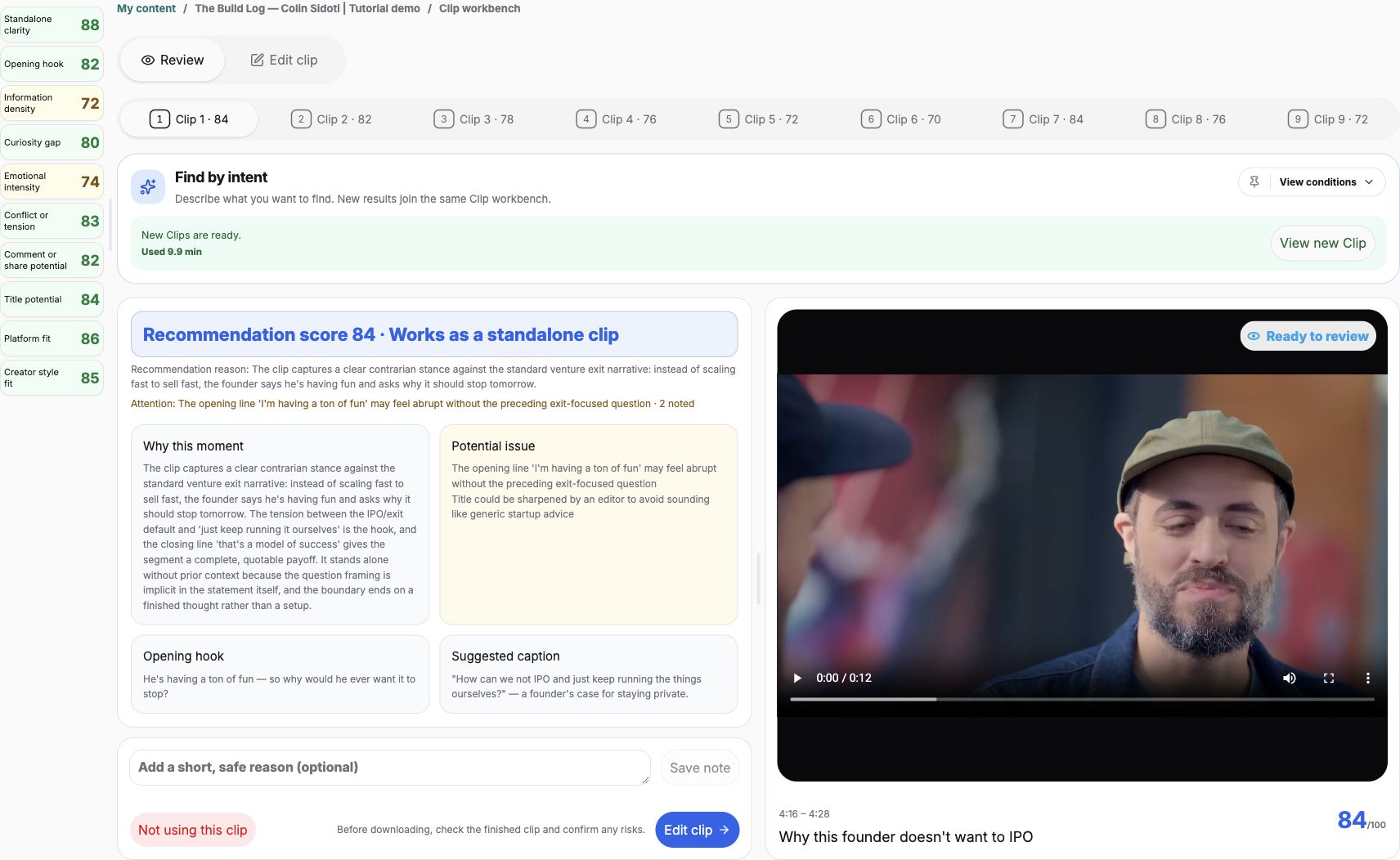
Draft titles could be “Staying motivated through a long startup build,” “Why this founder wants to keep running his company,” and “A roadmap test for customer feature requests.” Finalize each title after watching the cut so it matches what the speaker says.
These angles can form a useful set if each clip answers its own question. If your channel serves a narrower audience, choose only the angles that fit it. A product-management channel may reasonably skip the ownership discussion.
3. Treat the short roadmap cut and longer answer as alternatives
Our topic search returned more material about customer requests, including a longer passage with both roadmap and best-practice criteria. The longer edit runs about 45 seconds. The earlier roadmap edit runs about 24 seconds, including the host’s question.
These two exports substantially overlap in subject matter. The shorter version can introduce one decision rule; the longer version can support a fuller explanation. Posting both in the same sequence without a new editorial reason would repeat part of the answer.
Choose one for the set. Keep the other as an alternate for a different context, or use it later only when the additional material answers a distinct question. Changing the crop, subtitle style, or post title alone does not change the takeaway.
Another candidate, around 08:12–08:31, discusses refusing requests that conflict with best practice and the burden of long-term maintenance. It could offer a separate rationale, but it is close to the roadmap topic. Its blunt wording also needs context. Hear the surrounding conversation before making it the provocative centerpiece of a post.
4. Review each selected clip in ClipPrism
- Choose an owned or authorized recording and start with Automatic recommendations. For a video already processed, choose Find more in Recent content to search for another angle. Review the processing time before submitting; you do not need to upload the recording again while its source remains available.
- Read each candidate’s topic, reason, and potential issues. Write one sentence describing what a viewer would learn.
- Group candidates that answer the same question. Choose the most complete version or refine its boundaries.
- If a needed answer is missing, use Find by intent with a specific question and exclusions. This guide shows the actual brief and its results.
- For each chosen clip, review range, captions, framing, and the downloaded file separately.
On the Review page, read the recommendation analysis and notes on the left and watch the preview on the right. The desktop sidebar shows ten score dimensions; on a small screen, find them in the analysis area. These scores help prioritize review. Open Edit clip to change output settings, run the finished clip check and download.
For clips across recordings, open Batch review & export from My content. Search by clip or video name, filter by source, switch along the horizontal queue or choose Expand list. Free and Lite can browse and open individual clips; Standard adds continuous review and batch generation/download. For a batch, select clips that are kept and have a saved edit. A clip in the queue is not automatically eligible for export.
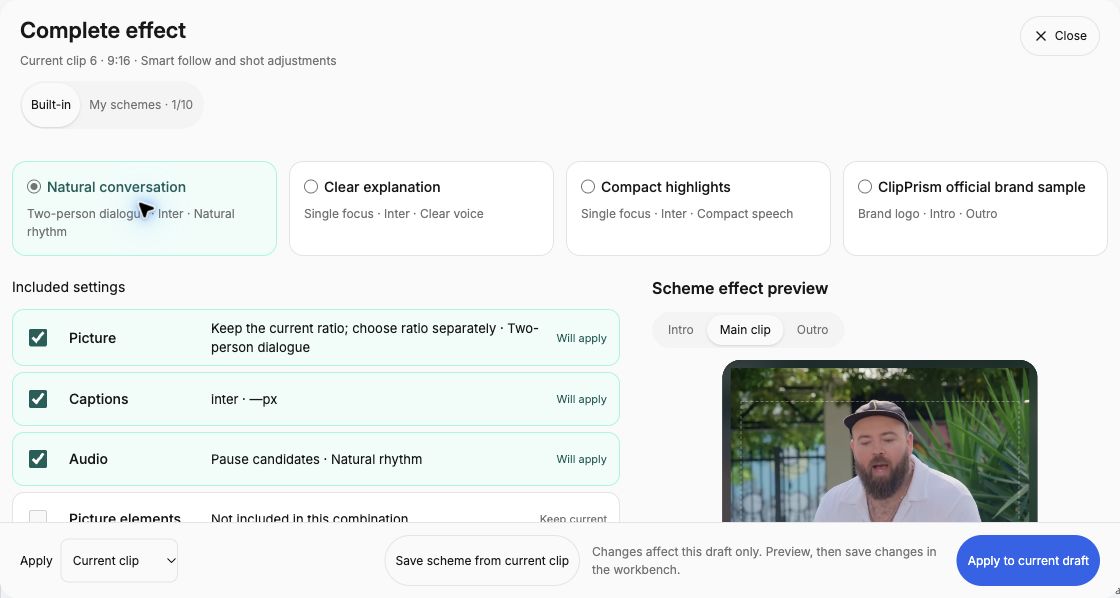
For a consistent show style, prepare a scheme in one of the five categories or combine the needed categories in Complete effect. Lite stores one personal scheme per category; Standard stores ten and supports batch application. Before applying to several clips, review the selected categories and whether any saved title text or media should replace existing content. Caption text, ranges and confirmed audio cuts remain clip-specific. Check each result after applying: the same layout can fit one speaker and obscure another.
For a professional editor receiving several saved clips from this video, Standard’s NLE handoff creates a separate timeline for each selected clip. It does not join them into one sequence or collect clips from different videos. Confirm the saved version of every item and inspect the package’s media and rebuilding instructions.
Keep a simple list in your episode notes with each clip’s viewer question, source range, draft title, and next edit. A useful review note is specific: “Use for the product-decision post; keep the question and do not present this as the complete framework.” Avoid a note such as “good clip,” which leaves the next editor with the same decision you started with.
New topic-search results join the same workbench, so track their purpose rather than assuming the larger count means a more diverse set. Check processing allowances before another search. A clearer brief can be more helpful than repeatedly asking for more highlights.
5. Arrange the posts around an audience journey
For a broad founder-interview audience, you might start with the long-build reflection, move to the founder’s definition of success, and finish with the product decision example. That moves from a relatable experience to a perspective and then a concrete practice. Choose the order that fits your channel and release schedule.
Make every clip understandable on its own. A viewer may encounter the third one first. Identify the speaker where needed, retain relevant context, and provide a clear route to the full episode. Review the publishing checklist for each file rather than approving the whole batch based on the strongest example.
Keep a simple record of what you publish and what people ask afterward. If two posts attract the same confusion, that may point to missing context. If an angle does not fit your audience, use that feedback when selecting from the next episode.
Build a repeatable look with personal schemes and Complete effect, or prepare saved video clips with the editor handoff guide.
For a specific moment that recommendations missed, use original-transcript search or create a Clip from a known source range. Build a social writing draft from each saved Clip when it needs its own introduction; review the wording against that Clip’s actual range.
Find different answers in your next episode
Open one recording, give three candidates different editorial jobs, and eliminate overlapping versions before you begin polishing the set.
Find clips from your podcastUse a recording you own or have permission to edit and share. Compare plans and available features.