
From Podcast to Publishable Shorts
How to Find Podcast Clips by Topic
Find the podcast moment your next post needs. Use a copyable topic-search brief, compare real results, and refine an answer in ClipPrism.
You remember a useful answer from an interview, but finding it again means scrubbing through the episode. Or your suggested clips focus on fundraising when your next post is about customer feedback. Searching by topic gives that review a clearer starting point.
Looking for a remembered word, exact quote or idea across your processed recordings? Use original-transcript search. It returns source passages to check, with free literal search and a separate allowance for searches by meaning. The workflow below asks for new Clip recommendations instead.
In ClipPrism, Find by intent lets you describe the passage you need, its intended viewers, topics to exclude, and your preferred length. This guide includes a reusable brief and shows how we refined one result into a clip about customer feature requests.
A better brief: name the explanation you want, say who needs it, and exclude neighboring topics. Then check the selected footage for relevance, context, and a complete ending.
What happened here: the search returned three suggestions. We chose the most relevant extended answer and trimmed it into a captioned clip of about 45 seconds.
1. Ask for an explanation, not just a keyword
For a video you have already processed, open My content and choose Find more in Recent content. This opens the existing video’s Find by intent panel. Opening it does not start a search; review your conditions and the processing time before submitting.
“Customer feedback” could mean collecting feedback, prioritizing it, or responding to complaints. A matching phrase does not tell you whether a passage will answer your viewer’s question.
Instead, describe the decision or explanation you want to hear. For this interview, the brief asked how Colin Sidoti evaluates customer feature requests: whether they advance the roadmap and follow best practices. That gives you something specific to look for in the returned footage.
Find a passage where [speaker] explains [specific decision or idea].
Keep the [question, reason, or example] needed to understand it.
The clip is for [intended viewer] who wants to [learn or decide something].
Exclude [specific neighboring topics].
Platform: [destination]. Preferred length: [range].
Use this template to write your own brief. Ask for material the recording actually contains; a brief cannot create a statement the guest never made.
If you know the topic but not the guest’s answer, leave the criteria open. For example: “How does the guest decide which customer feature requests to build? Keep the reason or example that makes the answer understandable.” You can name a specific criterion when you already know the passage you want to find.
2. Specify the audience and exclusions
Our source is a ten-minute interview with Clerk CEO Colin Sidoti on The Build Log. We wanted an excerpt for a specific founder and product-management audience. Here is the brief we used in Find by intent:
- What to find
- Find a complete explanation of how Colin Sidoti evaluates customer feature requests: whether they advance the product roadmap and follow best practices. Include enough context for a viewer who has not seen the interview.
- Exclude
- IPO and exit plans, fundraising advice, remote-team hiring, introductions, and closing remarks.
- Target audience
- SaaS founders and product managers deciding which customer requests to build.
- Publishing platform
- LinkedIn.
- Preferred length
- 30–60 seconds.
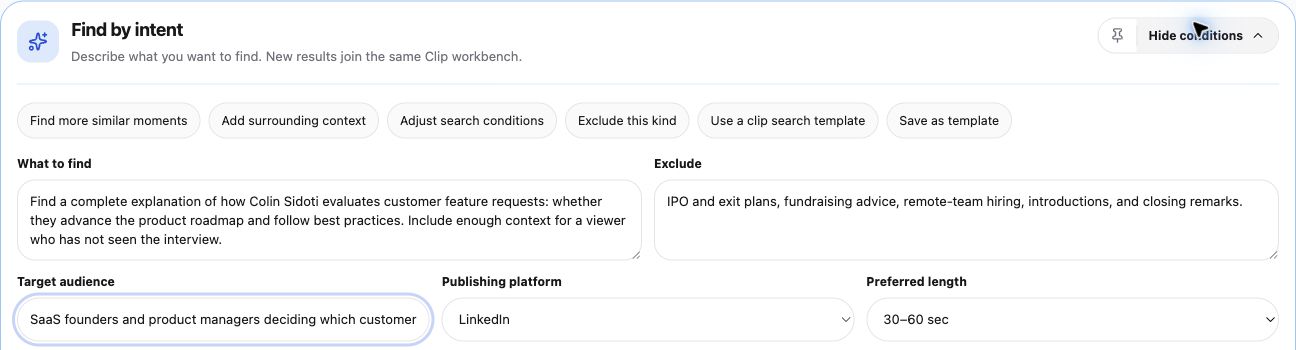
Each field has a different job. The topic specifies the answer. The audience indicates the expected background knowledge. Exclusions remove nearby but unwanted material. The platform gives the search a publishing preference. You will prepare the title and publish the finished clip separately.
Find by intent is available with Lite and Standard. A new intent search after results uses processing time based on the source video’s length, so refine your brief before confirming another run. View plans and processing allowances.
3. Check the results against the brief
This search returned three topic candidates. Their durations were approximately 55, 21, and 7 seconds. Only the longest was inside the requested 30–60-second range. The preference did not act as a strict duration filter in this run.
| Candidate in this run | What it offered | Editorial decision |
|---|---|---|
| About 55 seconds | A broader passage about the roadmap and best-practice criteria. Its analysis claimed a complete explanation. | Review and refine. Check whether the actual cut contains the whole explanation being claimed. |
| About 21 seconds | A narrower best-practice passage. | Set aside for this brief. It is shorter than requested and does not cover the same scope. |
| About 7 seconds | A compact roadmap excerpt. | Set aside for this brief. A relevant line is not the fuller explanation requested. |
Length and relevance are separate checks. A seven-second result can be on topic but too narrow for your purpose. A 55-second result can meet the length preference and still stop before the reason that makes its claim fair.
4. Verify the explanation against the cut
The longest candidate’s Recommendation analysis described it as a complete, self-contained answer. Its reason claimed the selected passage ended after the justification about long-term maintenance debt.
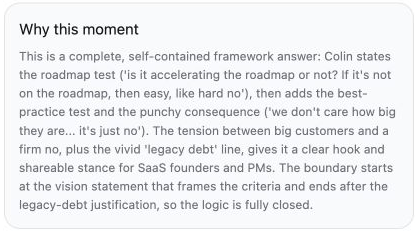
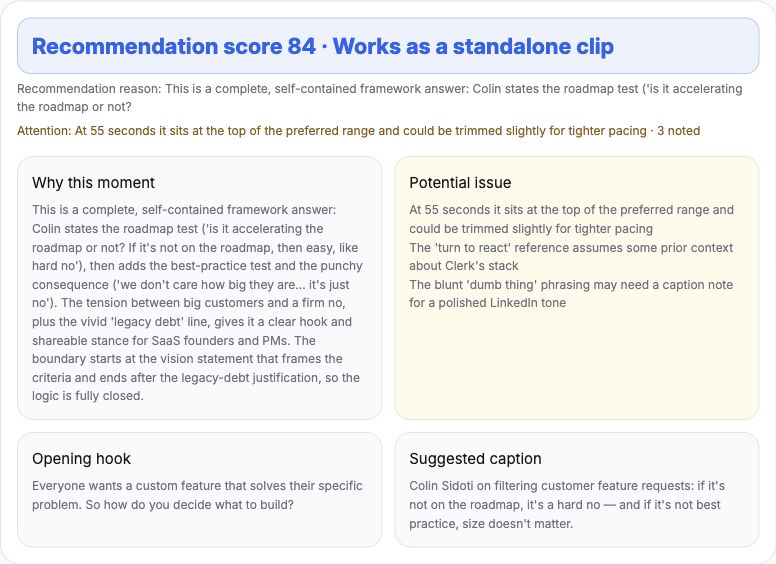
When we played the 55-second candidate, it stopped before the full explanation about long-term maintenance. We shortened the selection to keep one coherent passage: the roadmap criterion, the best-practice criterion and the product-experience rationale. The revised range runs from about 07:27 to 08:11.6 in the source.
After correcting captions, including Clerk and React, we exported the result. The captioned result is about 45 seconds in the original 16:9 frame.
For recurring names and technical spellings, ClipPrism offers Professional terms and Account glossary. Guide 5 explains how to preview term corrections and reuse a glossary, with a review before changes are saved.
Read the captions in the reviewed example
Captions from the video, formatted for reading.
We know what Clerk looks like in 10, 15 years. An initial question is just like, is it accelerating the roadmap or not? If it’s not on the roadmap, then easy, like hard no.
Another question we ask is like, do we believe it’s best practice, especially after the turn to React, the entire thing changes.
It’s not about how do we create an API with infinite flexibility. It’s how do we deliver an end user experience to their customers, right? And that needs to be great.
And so the goal isn’t have a million toggles to make that as flexible as possible. It’s really just give them the best practice approach.
This passage covers two criteria for customer requests. It mentions React without explaining it, which may work for a SaaS/product audience. For a broader audience, check whether the opening or a short title needs to establish more background.
Shortening helped because it removed an incomplete later point while preserving the chosen explanation. It is not a rule that shorter is always clearer. Sometimes the right fix is to retain more of the question or rationale, as the 12-to-24-second comparison shows.
5. Change one meaningful condition
When a result misses, identify the kind of miss before rewriting the whole brief. Otherwise, you will not know which change helped.
Wrong topic: replace a broad label with the specific decision. “How the founder evaluates feature requests” is more selective than “startup advice.” Add a concrete exclusion when a neighboring subject keeps appearing.
Right topic, missing explanation: ask for the question, reason, or example the viewer needs. A longer preference may allow more context, but you still have to verify that the returned cut includes it.
Useful content, wrong duration: inspect whether it can be edited into a complete passage. Do not pad a seven-second line to satisfy a time preference, or cut off the reason merely to stay under a limit.
No suitable passage: check the source and your constraints. You may be asking for a conclusion the speaker does not reach, or excluding context the answer needs. A different post can be a better decision than another search.
Keep the brief that worked in your editorial notes and adapt it for the next recording. Reuse the question’s structure, not assumptions about what a different guest must say.
Search for the answer your next post needs
Write one specific question, name its intended viewer, and list the topics to leave out. In My content, choose Find more for a processed video, then enter your brief in Find by intent.
Find clips by topic in ClipPrismUse a recording you own or have permission to edit and share.