
From Podcast to Publishable Shorts
How to Choose Podcast Moments That Work as Standalone Clips
Choose podcast clips a new viewer can follow. Compare two real cuts and learn how to judge relevance, context, and a complete ending before you edit.
The highest-scoring excerpt is not necessarily the one you should post. It might answer the wrong question, leave out a qualification, or make sense only to someone who remembers the previous five minutes.
A standalone clip lets a new viewer understand its point without opening the full episode for an explanation. The episode can offer more depth; it should not be required to decipher the short. For a podcast creator, the goal is a short that gives people a reason to explore the full conversation. Here is how to choose which AI-suggested clips deserve an edit in ClipPrism.
Choose in this order: fit for this post, enough context, a complete and fair point, then the strength of the opening. Use AI scores and reasons to decide which moments to review first.
1. Give the clip one editorial job
Finish this sentence before you compare candidates:
“After watching this, my viewer should understand…”
Make the answer specific enough to exclude something. “A useful business lesson” could describe almost any founder interview. “How this founder decides which customer feature requests to build” gives you a question against which to judge the footage.
For our example from The Build Log, an interview with Clerk CEO Colin Sidoti, we want to reach SaaS founders and product managers deciding which customer feature requests to build. That brief gives us a concrete reason to choose one moment over another.
A clip about an IPO could be valuable for a different post. It does not become the right choice for this one simply because it has a stronger score.
2. Compare fit, not just scores
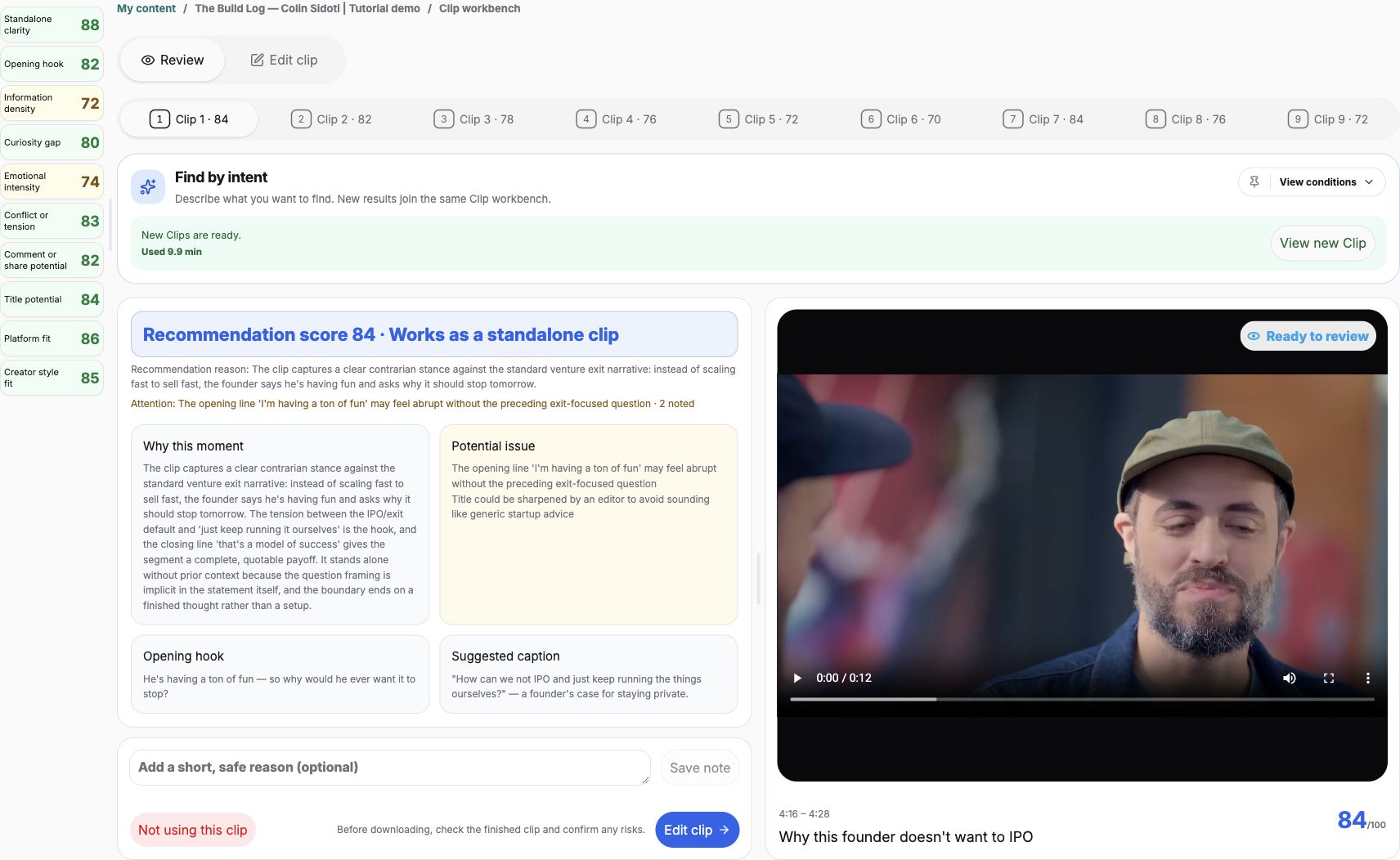
The automatic run produced six candidates. We chose the 70-point roadmap candidate rather than the 84-point IPO candidate.


| Candidate | Fit for this brief | Our decision |
|---|---|---|
| IPO topic 84/100 | Addresses a different topic from the customer-request question. | Set aside for this post. The higher score does not resolve the mismatch. |
| Product-roadmap topic 70/100 | Offers a decision rule relevant to the intended viewer. | Choose for refinement. Inspect context and captions before using it. |
A score helps prioritize your review. The best fit for a particular post depends on the viewer and the question you want to answer.
In ClipPrism, read the recommendation reason and potential issues as prompts for your review. When an explanation calls a clip complete, ask which sentence establishes the topic and which sentence completes the point. Verify those sentences in the selected footage.
3. Test the opening without the episode
Start at the first frame, without reading the AI explanation. Can you name the subject? Can you tell what problem the speaker is answering? A sentence can be grammatically complete while still leaving “it,” “that,” or “they” unexplained.
The original roadmap suggestion begins with the guest’s answer and lasts about 12 seconds. Our 24-second edit includes the preceding question. Compare what a new viewer gets in each version.
Content summary: the guest describes a long-term view of the company and a roadmap test for deciding what to build.
Read the captions in the reviewed example
Captions from the video, formatted for reading.
Host: How are you cutting through the noise and deciding when am I digging my heels in versus when am I getting blown every way the wind blows? How do you kind of find that center that allows you to push forward confidently?
Guest: We know what Clerk looks like in 10, 15 years. An initial question is just like, is it accelerating the roadmap or not? If it’s not on the roadmap, then easy, like hard no.
What the question adds
The added question frames a decision about when to stay the course rather than react to every competing demand. That makes the exchange easier to follow. But the question itself does not explicitly say “customer feature requests.” The answer also names Clerk without explaining the company.
The extra twelve seconds add useful framing, but they also create a longer opening. A short speaker introduction—“Colin Sidoti, CEO of Clerk”—would help orient viewers who do not know the guest.
For a post about feature requests, a possible title is “A founder’s roadmap test for customer feature requests.” That would identify the subject without promising a universal formula. Use the title to orient the viewer, then watch the clip on its own. If the topic is still unclear, include more of the preceding conversation or add a brief on-screen introduction in your publishing workflow.
The practical test is to ask someone unfamiliar with the episode what question the clip answers. If they need your explanation, identify the missing information before deciding whether to add context, revise the packaging, or choose another moment.
4. Keep the reason and qualification intact
Check meaning as well as sentence boundaries. A clean cut after a blunt statement can still distort the conversation if the next sentence explains when, why, or to whom that statement applies.
For the roadmap example, the short can communicate one criterion. It should not be packaged as the guest’s complete method for evaluating every request. The longer topic-search export includes an additional best-practice criterion and the product-experience rationale.
Before settling on an ending, ask: What claim does this clip leave the viewer with, and does the footage support that exact claim? Keep a necessary exception or explanation. Remove a tangent only when the remaining point stays fair. If the needed context is unavailable, set the candidate aside rather than using the post title to invent it.
Keep captions faithful, too. Correct a misrecognized name or timing error; do not rewrite the guest’s words into a stronger slogan. A promotional hook and a transcript serve different purposes.
5. Decide: keep, refine, or set aside
Use a concrete decision rather than “good” or “bad.” This makes the next edit clear, especially when someone else will prepare the post.
| Decision | When to use it | What to do next |
|---|---|---|
| Keep | The topic fits, a newcomer can follow it, and the point ends fairly. | Check the actual captions, sound, framing, and exported file before posting. |
| Refine | The idea fits, but the opening, ending, or captions have a specific problem. | Name the repair: include the question, retain a qualification, label the subject, or correct a word. |
| Set aside | The moment serves a different post, or its meaning cannot survive the available cut. | Choose a different candidate or search for the missing explanation. |
For this post, the roadmap answer is worth keeping. The question helps frame the decision, but new viewers still need to know who Colin is and that he is discussing customer feature requests. Make those clear when preparing the post, and present the answer as one criterion.
For the upload, editing, and export sequence, use the complete ClipPrism walkthrough. Once you have chosen a moment, the start-and-end guide helps you turn that decision into a clean cut.
Review a shortlist against your next post’s question
Bring a video podcast and one question your audience cares about. Compare ClipPrism’s suggestions, then choose the moment that answers it most clearly.
Find your next podcast clipUse a recording you own or have permission to edit and share.